API & System Integrations
Supported connections between the business applications, databases, and services that should continue to play a role.
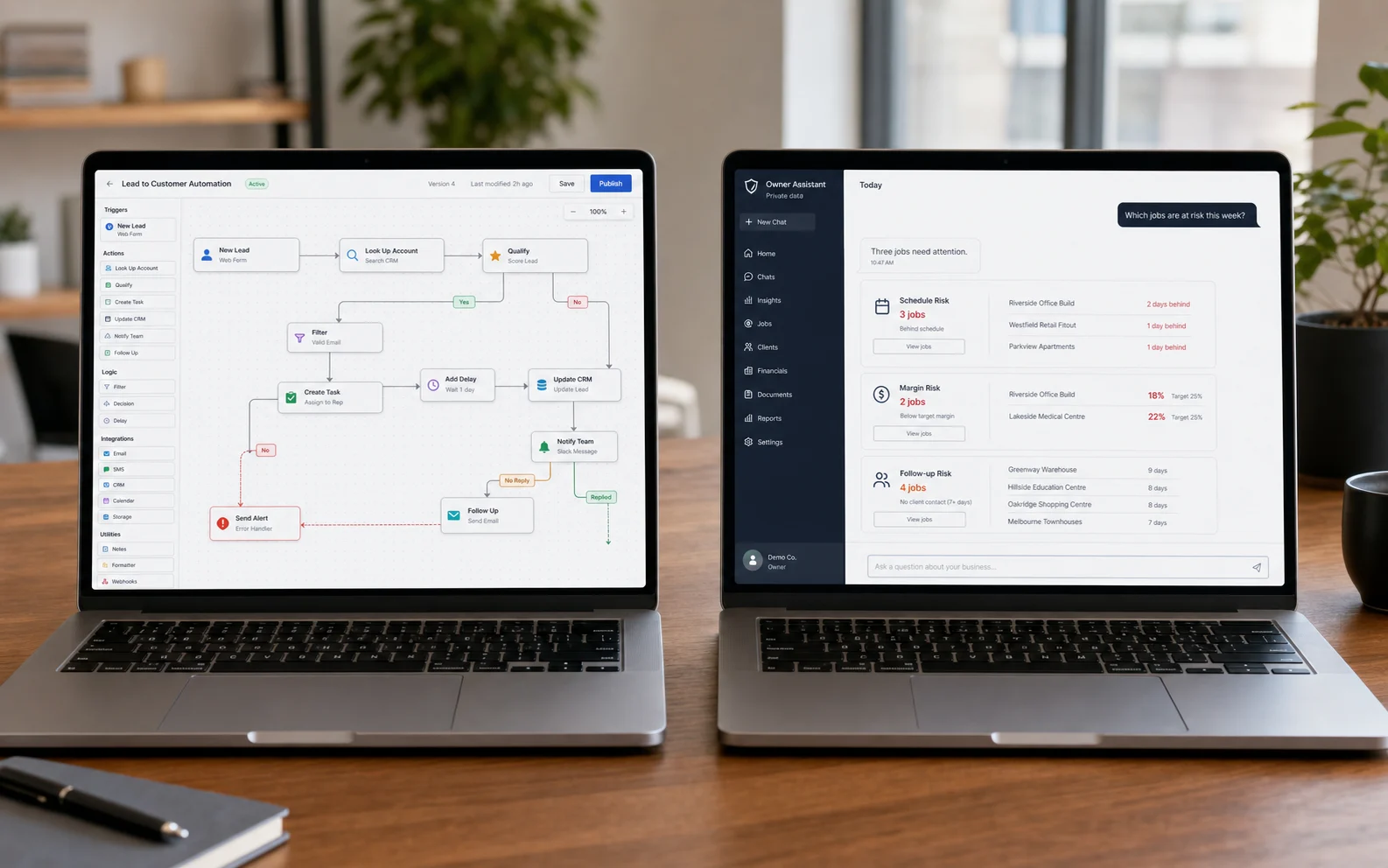
Connect the tools your business already uses, automate repeated steps, and apply AI to bounded, useful work with clear human review and a responsible fallback.
10+ yearsbuilding software
60+ projectsdelivered
Utahfounded & headquartered
5.0 / 5stars on Google
Trusted by businesses like

The best automation removes a known burden. The best AI feature has a specific job, useful context, and a clear path when the model should not decide.
Supported connections between the business applications, databases, and services that should continue to play a role.
Rules and background processes that move information, create tasks, update records, and reduce repetitive handoffs.
Useful event-driven reminders, status changes, and guided follow-up without asking staff to repeat the same communication.
Structured extraction, classification, routing, and review workflows for information that currently requires repetitive manual handling.
Bounded conversational tools that help authorized users ask useful questions of approved company data and source material.
AI-assisted drafting, summarization, matching, or recommendation flows where a person retains control over consequential actions.
Automation is most valuable when the repeated work is already understood, the source systems are accessible, and the expected outcome can be checked.
Businesses with repeated entry, manual follow-up, document handling, status updates, or coordination work that follows recognizable rules.
Leaders who can define the user, approved information, expected output, review step, fallback, and business value of the feature.
We map the repeated work and its human owner, prototype one useful automation or AI-assisted step, and measure whether it removes real effort without weakening review or accountability.
Trace the repeated work, systems, data access, decision boundaries, exceptions, human owner, and expected business value.
Make the user experience and human review path tangible in one week using staged representative data.
Measure the effort removed, the rework avoided, the quality of the result, and what still needs human judgment.
Connect production systems only after the workflow, review path, fallbacks, responsibilities, and useful result are clear.
Automation and AI are useful when responsibility remains visible. Every consequential path needs an owner, a way to review the result, and a safe response when the system is uncertain.
Deterministic automation handles predictable work. AI is reserved for tasks where language, interpretation, or matching adds real value.
Data sources, access boundaries, retention expectations, vendors, and sensitive-data constraints are identified before production use.
Review, approval, escalation, and fallback paths are part of the workflow rather than optional safeguards added after launch.
From operation map to owned software
One weekfirst working prototype
$2,500flat-rate prototype
8–16 weekstypical approved build
30 dayspost-launch support
Map how the work happens with Jake, choose one workflow to prototype, and define the improvement your team will measure before anything expands.
Book a Discovery CallReal engagements where connected workflows removed repetitive coordination, without inventing an AI claim.
Many repeated workflows are better served by clear rules and API integrations. AI earns its place when language, interpretation, matching, or summarization creates useful value and the workflow includes an appropriate human review or fallback.
Usually, when those products provide supported APIs, webhooks, exports, or other reliable integration paths. We confirm access, limits, ownership, and failure behavior before including an integration in the build.
Useful bounded examples include drafting, summarization, structured extraction, classification, matching, recommendation support, and asking questions of approved business data. We do not sell AI as decoration or promise that it should replace accountable human decisions.
Data sources, vendors, access, retention, logging, and review responsibilities are evaluated before production commitments. Confidential, regulated, payment, credential, or production data should not be placed into a prototype unless an approved handling plan exists.
The workflow should define a clear fallback, review step, escalation path, or refusal behavior. The responsible response depends on the consequence of the task and is included in the locked workflow before production engineering.
The visible workflow can be prototyped in one week. Production timing depends on integrations, data access, vendor constraints, review requirements, logging, fallbacks, and the locked completion criteria. Most approved builds take 8–16 weeks.